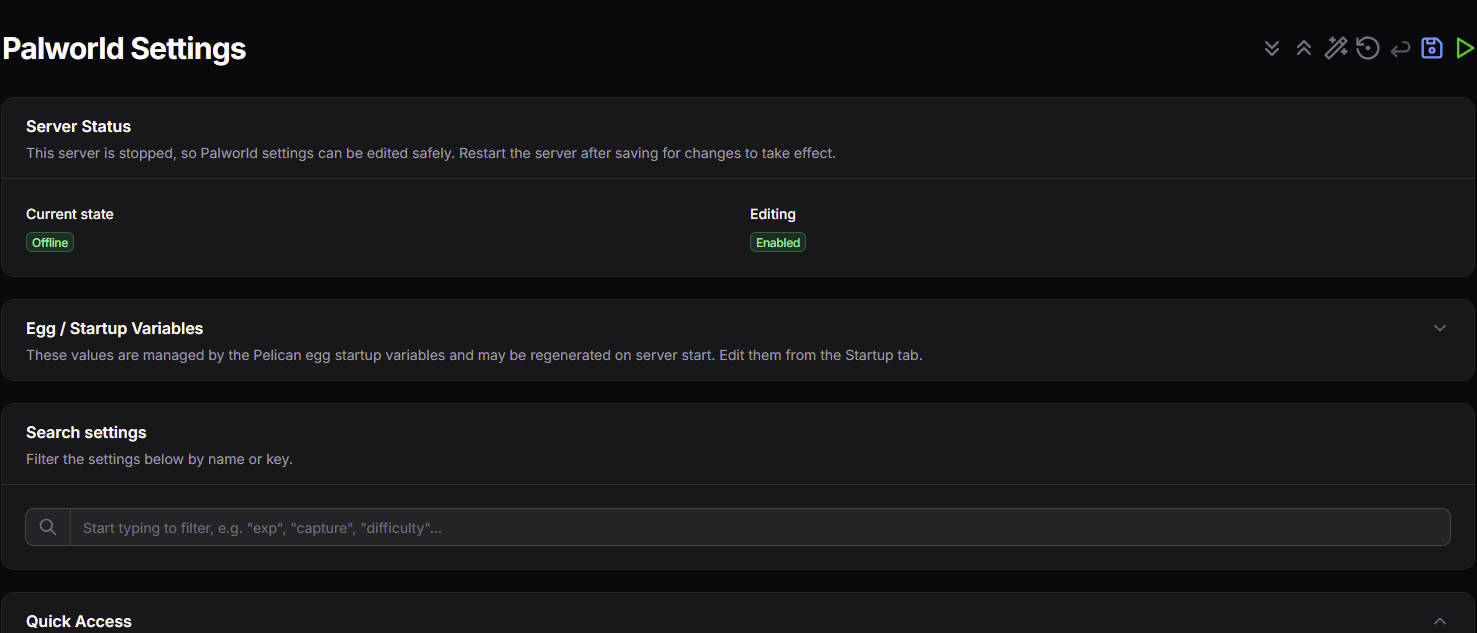
Palworld Settings Editor
 Kootherpalli
18
Downloads
--
Positive (0 reviews)
9 hours ago
Last Updated
Manual Plugin Import
- Log in to your panels admin area.
- Navigate to the Plugins section.
- Click the Import from File icon ()
- Upload the downloaded ZIP file and complete the install.
Palworld Settings Editor
A Pelican Panel server-panel plugin for safely editing Palworld gameplay and world settings straight from the panel — no manual file editing, no SSH.
It tracks the current Palworld dedicated-server settings — including the options
added in the Palworld 1.0 release (proximity voice chat, Monster Farm speed,
and more) — and adds a Palworld Settings page to a Palworld server view that
reads, parses, and rewrites the OptionSettings=(...) payload in:
Pal/Saved/Config/LinuxServer/PalWorldSettings.ini
It's built for the standard Palworld Pelican egg workflow, where some values are owned by startup variables and may be regenerated on boot — so the editor stays out of their way and only touches what's safe to change.
[!WARNING] Stop the server before editing. The editor only allows saving while the server is confirmed offline/stopped, and a timestamped backup is written before every save. Start the server after saving (there's a button on the page) to apply your changes.
Features
- Native panel integration — adds a Palworld Settings page to the Pelican server sidebar using native Filament controls and the panel's own page layout, so it sits naturally alongside the built-in Startup and Settings pages.
- Palworld-only — the page only appears on Palworld servers, detected from the server egg (tags, name, startup command, and Docker image).
- Typed controls — numbers and integers (with sensible min/max/step bounds), plus toggles, text fields, and enums — each with clear labels, helper text, and tooltips.
- Grouped settings — organized into readable sections:
- Gameplay Rates
- Damage, Stamina, Hunger, HP
- Time and World Behaviour
- Death and Difficulty
- Base, Guild, and Limits
- Advanced / Present-only Fields
- Live search — filter the 100+ settings by name or key; matching sections expand automatically and empty ones hide.
- Presets — one click applies a themed set of values (Casual, Normal/Vanilla, Hardcore, PvP, Fast Progression); only keys present in your file are touched, and nothing is written until you Save.
- Start / restart from the page — apply saved settings without switching tabs; permission-gated (shown only if you can control the server's power state).
- Safe-by-default saving — writes are blocked unless the server's power state
resolves to offline/stopped (via Pelican's native
retrieveStatus()). - Backups manager — a timestamped copy of the config is created before every save, and existing backups can be restored (the current file is backed up first) or deleted right from the page.
- Reset to Palworld defaults — refill the form with Palworld's default values
(from the game's
DefaultPalWorldSettings.iniwhen available); nothing is written until you press Save. - Expand / collapse all — quickly open or close every settings section.
- Non-destructive rewrites — unknown
OptionSettingskeys are preserved when the file is written back. - Respects egg-managed values — startup-variable values (server name, passwords, RCON, ports, etc.) are shown read-only and never edited here.
Requirements
- A working Pelican Panel install with a Palworld server using the Palworld egg.
- Access to the Pelican admin plugin UI (or the panel's
pluginsdirectory) to install the plugin. - The server must have been started at least once so Palworld can generate
PalWorldSettings.ini.
Installation
Install it like any Pelican plugin — pick whichever method fits your setup. Each one leaves the plugin installed and enabled; afterwards, open a Palworld server and go to Palworld → Palworld Settings.
From the Pelican Hub (one-click)
Open Palworld Settings Editor on the Hub, select your connected panel, and click Install.
From the admin UI (upload a zip)
- Get the plugin as a zip containing a top-level
palworld-settings-editor/directory (clone this repo and zip the folder, or grab a release archive). - In Pelican, go to admin → plugins, import the zip, then install/enable it.
From the command line (artisan)
-
Place the
palworld-settings-editor/directory in your panel'splugins/directory (e.g./var/www/pelican/plugins/palworld-settings-editor). -
From your panel root, run one of:
php artisan p:plugin:install palworld-settings-editor   # install by id
php artisan p:plugin:install                            # or pick it from the list
This installs and enables the plugin in one step.
[!TIP] Run artisan as the user that owns your panel files (often
www-data), not asroot, so the plugin's files stay writable by the panel — e.g.sudo -u www-data php artisan p:plugin:install palworld-settings-editor. This CLI method is also a reliable fallback if a Hub or admin-UI install fails.
Usage
- Stop the server. Saving is disabled while it's running.
- Open Palworld Settings and adjust the values you want (use search or a preset to move faster).
- Save. A backup of the current
PalWorldSettings.iniis created first, then your changes are written. - Start the server (there's a Start server button right on the page) to apply the changes.
[!NOTE] Startup-managed values (server name, passwords, RCON, public IP/port) are shown read-only. Change those from the server's Startup tab — the egg manages them and may overwrite the INI on boot.
Configuration
Plugin config lives in config/palworld-settings-editor.php
(auto-loaded by Pelican — no publish step needed):
| Key | Default | Purpose |
|---|---|---|
settings_path |
Pal/Saved/Config/LinuxServer/PalWorldSettings.ini |
Server-relative path to the INI. The page auto-falls back to the WindowsServer path if this one is absent. |
backup_suffix_format |
Ymd-His |
PHP date format for the .bak-… backup suffix. |
show_debug_section |
false |
When true, shows the developer diagnostics section (raw OptionSettings line, unmapped keys, file preview, state diagnostics). |
Developer diagnostics are hidden by default. To surface the debug section, set:
'show_debug_section' => true,
Scope
Does:
- Edit supported
OptionSettingsvalues fromPalWorldSettings.iniwith typed, grouped, searchable controls and one-click presets. - Detect server power state and gate saving on a safe (offline) state.
- Back up the config before each save, and let you restore or delete backups in-panel — preserving unknown keys throughout.
- Reset the form to Palworld defaults and start/restart the server from the page.
Does not:
- Edit egg/startup-managed values (server name, passwords, RCON, IP/port).
- Edit arbitrary host paths outside Pelican's server file abstractions.
- Enable editing while the server is running, starting, stopping, suspended, or in an unconfirmed state.
Compatibility with the Palworld egg
This plugin is built for the official games-steamcmd/palworld egg and its PalworldServerConfigParser.
The config parser runs on every boot but does an in-place update of only the INI keys whose startup variables are set (server name/description, passwords, RCON, max players, IP/port) and preserves everything else. This plugin edits a disjoint set of gameplay/world keys, so your edits are not overwritten on restart. The keys the egg manages are shown read-only here — change those from the Startup tab instead.
[!NOTE] If you add your own egg variable for a gameplay setting this plugin also edits, the parser will set that key from the variable on boot. With the stock egg there is no overlap. On Proton/Windows servers the config lives under
WindowsServer/— the plugin falls back to that path automatically.
Troubleshooting
The Palworld Settings page doesn't appear
The page only shows on Palworld servers. It detects Palworld from the egg's tags,
name, startup command (which contains PalServer / PalworldServerConfigParser),
and Docker image. If it's missing on a genuine Palworld server, the egg may be
packaged unusually — confirm the server uses the Palworld egg.
Config file missing
Start the Palworld server once so it generates PalWorldSettings.ini, then stop
it and reload the plugin page.
Save button is disabled
Saving is only enabled when the server's power state resolves to offline/stopped (via Pelican's native status check). If the server is running — or the state can't be confirmed safely — saving stays disabled.
Start / Restart button is missing
The power actions are permission-gated: Start needs the control.start and
Restart the control.restart subuser permission on the server (an owner/admin has
both). Start shows while the server is stopped and PalWorldSettings.ini exists
(if the config file hasn't been generated yet the button stays hidden — see Config
file missing above); Restart shows whenever the server isn't confirmed stopped
(running, or when the daemon state can't be read).
Some values keep getting overwritten
Those are egg-managed startup variables. They're intentionally excluded from editing here because the Palworld egg may rewrite them on server start. Change them from the Startup tab.
File API / adapter errors
The plugin reads and writes through Pelican's daemon-backed file APIs. If file operations fail, check Pelican/Wings connectivity, daemon permissions, and server file access.
Using a Proton / Windows-style setup
The primary target is the Linux path (.../LinuxServer/...). On Proton/Windows
servers Palworld generates the config under .../WindowsServer/...; the plugin
detects the missing Linux file and falls back to the Windows path automatically. If
your egg writes it somewhere else, point settings_path at it in the config file.
Project structure
| Path | Responsibility |
|---|---|
src/Filament/Server/Pages/PalworldSettingsPage.php |
The settings page: loads state, builds the form, validates and writes saves. |
src/PalworldSettingsEditorPlugin.php |
Plugin registration and server-panel page discovery. |
src/Services/PalworldSettingsSchema.php |
Field definitions, labels, groups, bounds, tooltips, default values, and presets. |
src/Services/PalworldOptionSettingsParser.php |
Parses and rewrites the OptionSettings=(...) payload. |
src/Services/PalworldSettingsFileService.php |
File read/write/copy plus backup listing and deletion through Pelican's daemon file API. |
src/Services/PelicanServerStateService.php |
Server state detection (native retrieveStatus()) and "safe to edit" logic. |
src/Services/PelicanStartupVariableService.php |
Startup-variable lookup and read-only display. |
src/Services/PalworldServerDetector.php |
Detects whether a server runs Palworld to scope page visibility. |
Contributing
Issues and pull requests are welcome. The plugin deliberately sticks to native Filament/Pelican controls and appearance rather than heavy custom theming — please keep changes close to existing patterns and test against a live Pelican panel by rebuilding the zip and re-uploading.
Requirements
- File Size
- 47.6 KB
- License
- Proprietary