User Game Server Creator
 Smayt
Smayt
9
Downloads
--
Positive (0 reviews)
1 week ago
Last Updated
Manual Plugin Import
- Log in to your panels admin area.
- Navigate to the Plugins section.
- Click the Import from File icon ()
- Upload the downloaded ZIP file and complete the install.
User Game Server Creator (UGSC)
A Pelican Panel plugin that lets non-admin users create their own game servers through a simplified, self-service flow — without needing access to the full admin server-creation form.
Friends pick a game from a visual picker, adjust a player-count slider, and deploy. Resource limits, node capacity, and required egg variables are all handled automatically.
Why
Pelican's built-in server creation is an admin-only flow with a full form of every egg variable, node selection, and raw resource fields. UGSC adds a parallel, restricted flow so trusted non-admin users (e.g. a friend group) can spin up their own servers within limits an admin sets, without ever touching the admin panel.
Features
- Visual game picker — browse available eggs by category with artwork (grid/banner/list images), instead of a raw dropdown.
- Simplified configure page — a single player-count slider drives CPU/memory (and map size, for supported eggs) via linear interpolation between admin-configured min/max values, instead of asking users to guess raw resource numbers.
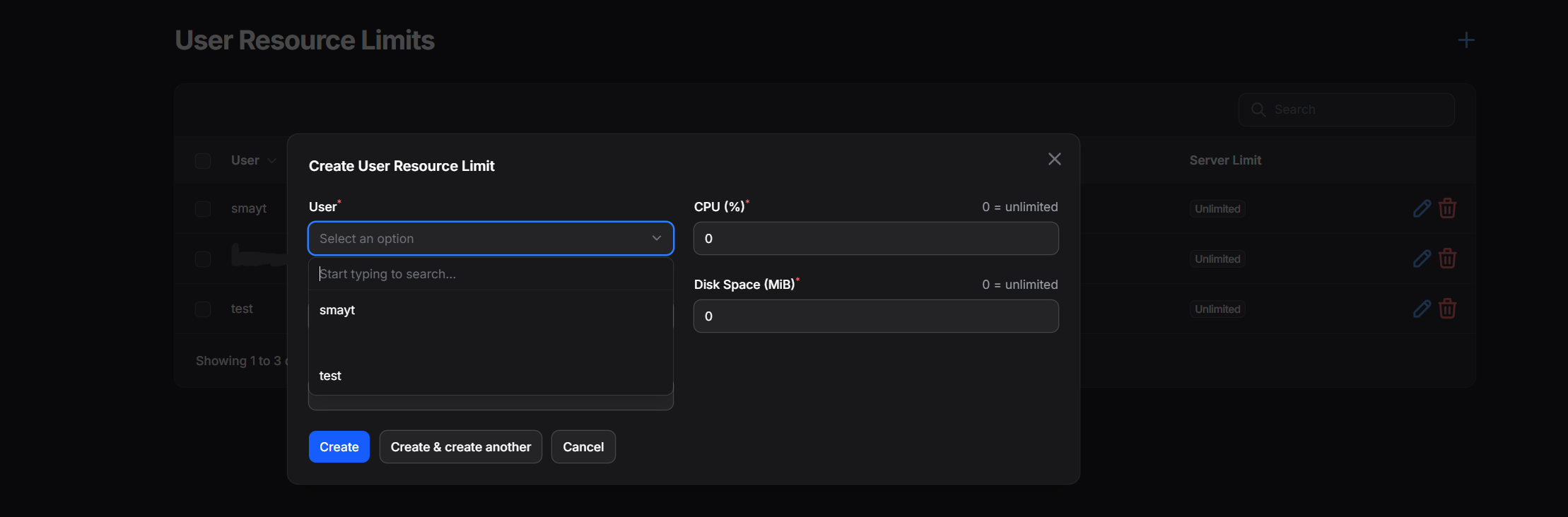
- Per-user resource limits — admins set a CPU/memory/disk/server-count budget per user (
ugsc_user_resource_limits); users cannot exceed their own budget. - Node capacity guard — independent of user budgets, a request is also checked against the actual node's physical capacity:
- CPU / memory: a soft warning (with an in-page confirm dialog) if the request exceeds what's currently free on the node, and a hard block if it exceeds the node's raw configured total.
- Disk: always hard-blocked the moment it exceeds free disk space. Disk is never allowed to be overallocated, regardless of node settings.
- Both checks run on the client (for instant feedback) and independently on the server (the actual enforcement boundary — a direct API call cannot bypass it).
- Server variables page — after configuring resources, users are shown any required, user-editable egg variables (pre-filled with admin-configured defaults), matching what's normally only available on the full admin create-server form. Admin-only variables are hidden unless they have no usable default, in which case they're surfaced as a flagged exception so server creation never silently fails.
- Image management — per-egg grid/banner/list artwork with manual fetch/upload/protect/clear actions, plus bulk operations, in a dedicated admin page (Icon Settings).
- Permissions / visibility system — built on Pelican's native Subuser system. Admins can grant a user visibility (and therefore console/start/stop/restart access) and/or delete rights on specific other-owned servers, with bulk grant-all/revoke-all actions.
- Server deletion controls — owners can be locked out of deleting their own server, and non-owners can be individually granted delete rights on specific servers.
- Categories & per-egg settings — admin-configurable categories for the game picker, and per-egg settings (player count range, base/max CPU and memory, disk size, slots-mode toggle).
Requirements
- Pelican Panel
^1.0.0-beta35or later.
Installation
- Download the latest release zip (or clone this repo into
plugins/user-game-server-creator). - Make sure the folder name is exactly
user-game-server-creator(must match the plugin id inplugin.json). - From your panel directory, run:
   php artisan migrate
   php artisan optimize:clear
- Enable the plugin from the admin panel's plugin list if it's not already active.
Setting up access for a user
A user has no access to UGSC (cannot see the game picker or create servers) until an admin explicitly grants them resource limits:
- Go to Game Server Creator Settings > User Resource Limits in the admin panel.
- Create a record for the user, setting their CPU / memory / disk / server-count budget (use
0or leave blank for unlimited, depending on the field). - The user can now access the create-server flow from the app panel.
Root admins always have full access regardless of this table.
Per-egg setup
Before a game can be created through UGSC, an admin should configure it:
- Egg Settings (
Game Server Creator Settings > Egg Settings): player count range, base/max CPU and memory for the slider interpolation, disk size, and whether the egg uses "slots" or "max players" terminology. - Icon Settings (
Game Server Creator Settings > Icon Settings): fetch or upload grid/banner/list artwork per egg, with an option to protect images from being overwritten by bulk fetches. - Categories (
Game Server Creator Settings > Categories): group eggs for the game picker.
Eggs with no Egg Settings configured won't behave correctly on the slider page — set these up for every game you want to expose through UGSC.
Node capacity guard details
The guard intentionally treats disk differently from CPU/memory, since disk cannot be safely overcommitted the way compute resources can:
| Resource | Soft warning (confirm to proceed) | Hard block (no override) |
|---|---|---|
| CPU / Memory | request exceeds free capacity (raw minus already-used) | request exceeds raw node total |
| Disk | — (no soft tier) | request exceeds free disk space |
This applies on top of, not instead of, each user's own resource budget. Pelican's node overallocate settings are intentionally not used by this guard — the raw cpu/memory/disk columns on the node are the source of truth.
Permissions model
- Visibility grants use Pelican's native Subuser system and bundle console access, start, stop, and restart permissions together — there is currently no way to grant view-only access without also granting control.
- Delete grants are a separate UGSC-specific table (
ugsc_server_delete_grants) and require visibility to already be granted (delete implies visibility). - Server owners can be locked from deleting their own server via
ugsc_server_delete_locks.
Known limitations
- Egg variables that are not marked
user_editableand have no default value are surfaced on the variables page as a flagged exception, but there is no per-egg validation beyond what Pelican's own server creation service enforces. - The node capacity guard does not account for multiple concurrent in-flight requests racing each other (last-write-wins at the database level, same as Pelican's own admin creation flow).
License
MIT — see LICENSE.
Requirements
- File Size
- 118.17 KB
- License
- Proprietary