Reverse Proxy
 Hugo
Hugo
14
Downloads
--
Positive (0 reviews)
3 weeks ago
Last Updated
Manual Plugin Import
- Log in to your panels admin area.
- Navigate to the Plugins section.
- Click the Import from File icon ()
- Upload the downloaded ZIP file and complete the install.
Reverse Proxy
A Pelican Panel plugin that lets users create and manage Nginx reverse proxies for their game servers — point a custom domain at a server allocation, with HTTP-only, Let's Encrypt or manual SSL.
How it works
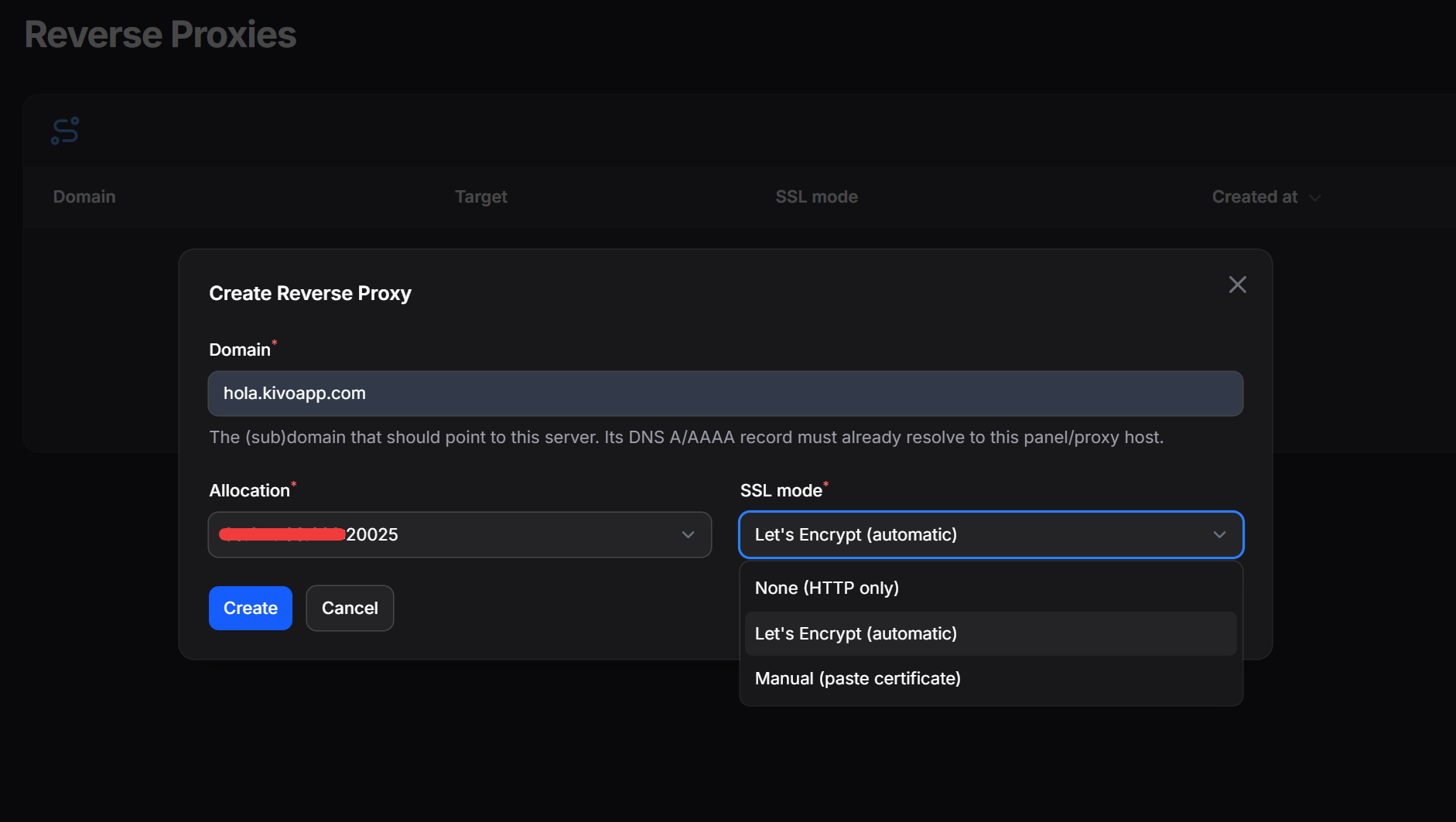
Users open the Reverse Proxies tab on their server, pick a domain and allocation, choose an SSL mode and hit create. The plugin writes a vhost file, runs nginx -t (rolling back if it fails), then reloads Nginx. For Let's Encrypt it handles the ACME challenge automatically; renewals are handled by certbot's own timer.
Generated vhosts include HTTP→HTTPS redirects, HTTP/2, TLS 1.2/1.3 and WebSocket upgrade headers by default.
Requirements
- Nginx on the host that will terminate traffic (usually the panel host).
- certbot for automatic SSL (
apt install certbot). - The panel web user needs write access to the vhost directory and permission to run
nginx -t,nginx -s reloadand certbot — the setup script handles all of this.
The proxy host must be able to reach each server's allocation ip:port. DNS for proxied domains must point at the proxy host before requesting a Let's Encrypt certificate. Servers with wildcard allocations (0.0.0.0 / ::) are not eligible.
Installation
1. Install the plugin
Clone into plugins/ as reverse-proxy (the folder name must match the plugin id):
cd /var/www/pelican/plugins
git clone https://github.com/Huguitis/ReverseProxyPelican.git reverse-proxy
cd /var/www/pelican
php artisan p:plugin:install
Or upload the zip through the admin Plugins page and install from there.
2. Run the setup script
The plugin runs as the web user, but Nginx and certbot need root. Run this once and it handles everything: creates the directories, installs a scoped sudoers rule and writes the necessary vars to .env.
sudo bash plugins/reverse-proxy/scripts/setup.sh
Pass the web user explicitly if auto-detection is wrong:
sudo bash plugins/reverse-proxy/scripts/setup.sh www-data
After this the Create proxy button works with no further configuration.
3. Set per-server limits
Every server starts with a proxy limit of 0. Raise it on the admin server-edit page: open the Reverse Proxies tab, set Limit and save — same as the backup or allocation limit.
Configuration
Settings live in config/reverse-proxy.php and are overridable via .env:
.env key |
Default | Description |
|---|---|---|
REVERSE_PROXY_SITES_PATH |
/etc/nginx/pelican-proxy/sites |
Where vhost files are written. |
REVERSE_PROXY_CERTS_PATH |
/etc/nginx/pelican-proxy/certs |
Where manual certificates are stored. |
REVERSE_PROXY_TEST_COMMAND |
nginx -t |
Validation command run before every reload. |
REVERSE_PROXY_RELOAD_COMMAND |
nginx -s reload |
Nginx reload command. |
REVERSE_PROXY_COMMAND_TIMEOUT |
120 |
Max seconds for any shell command. |
REVERSE_PROXY_WEBSOCKETS |
true |
Include WebSocket upgrade headers. |
REVERSE_PROXY_HSTS |
false |
Send HSTS header on SSL vhosts. |
REVERSE_PROXY_EXTRA_LOCATION |
– | Extra directives injected into each location /. |
REVERSE_PROXY_LETSENCRYPT |
false |
Enable the Let's Encrypt SSL mode. |
REVERSE_PROXY_LETSENCRYPT_EMAIL |
– | Contact email for ACME (required for LE). |
REVERSE_PROXY_LETSENCRYPT_WEBROOT |
/var/www/letsencrypt |
Webroot the ACME challenge is served from. |
REVERSE_PROXY_LETSENCRYPT_LIVE |
/etc/letsencrypt/live |
certbot's live certificate directory. |
REVERSE_PROXY_CERTBOT |
certbot |
certbot binary path. |
REVERSE_PROXY_LETSENCRYPT_STAGING |
false |
Use the LE staging endpoint while testing. |
REVERSE_PROXY_LETSENCRYPT_DELETE |
false |
Run certbot delete when a proxy is removed. |
Set
REVERSE_PROXY_LETSENCRYPT_STAGING=truewhile testing to avoid rate limits.
SSL modes
- None — plain HTTP proxy on port 80.
- Let's Encrypt — certbot obtains and auto-renews the certificate. Port 80 must be open and the domain must already resolve to this host.
- Manual — paste a PEM full-chain certificate and private key. The key is stored
0640and never saved to the database.
The Re-sync action on each proxy re-renders the vhost from the current allocation and SSL settings — useful after a server transfer or allocation change.
License
MIT — see LICENSE.
Requirements
- File Size
- 29.6 KB
- License
- Proprietary