Resource Usage Alerts
 Blue Wolf
12
Downloads
--
Positive (0 reviews)
1 month ago
Last Updated
Manual Plugin Import
- Log in to your panels admin area.
- Navigate to the Plugins section.
- Click the Import from File icon ()
- Upload the downloaded ZIP file and complete the install.
Resource Usage Alerts
Resource Usage Alerts is a Pelican Panel plugin for monitoring server and node resources. It stores durable alert history, waits for conditions to persist, applies notification cooldowns, and resolves alerts automatically after recovery.
Requirements
- Pelican Panel with PHP 8.3 or newer
- Laravel queue worker
- Laravel scheduler running every minute
- Reachable Wings nodes for live metrics
- A configured mailer for email notifications
- HTTPS and the PHP
openssl,curl, andmbstringextensions for browser push
The plugin was built against the local Pelican installation using Laravel 13 and Filament 5.6.
Installation through Plugin Upload
- Create a ZIP whose top-level folder is named
resourceusagealerts. - Open the Pelican admin plugin page and import the ZIP.
- Install and enable the plugin.
- Configure plugin settings and permissions.
The plugin installer automatically discovers and runs migrations in database/migrations.
Manual Installation
cd /var/www/pelican
cp -R /path/to/resourceusagealerts plugins/resourceusagealerts
php artisan p:plugin:install
php artisan resource-alerts:push-keys
php artisan optimize:clear
When developing through a symlink, the link must resolve to plugins/resourceusagealerts and the directory name must remain identical to the plugin ID.
Queue and Scheduler
Run a persistent queue worker:
cd /var/www/pelican
php artisan queue:work --tries=3
Run Laravel's scheduler from cron:
* * * * * cd /var/www/pelican && php artisan schedule:run >> /dev/null 2>&1
The default polling interval is five minutes. Collection and evaluation are queue jobs, so the sync queue driver is not recommended: slow or unavailable Wings nodes would otherwise block scheduler execution.
Configuration
| Variable | Default | Description |
|---|---|---|
RESOURCE_USAGE_ALERTS_ENABLED |
true |
Enables scheduled monitoring |
RESOURCE_USAGE_ALERTS_POLL_INTERVAL |
5 |
Collection and evaluation interval in minutes |
RESOURCE_USAGE_ALERTS_SAMPLE_RETENTION_DAYS |
14 |
Raw sample retention |
RESOURCE_USAGE_ALERTS_EVENT_RETENTION_DAYS |
90 |
Resolved event retention |
RESOURCE_USAGE_ALERTS_DISCORD_TIMEOUT |
5 |
Discord request timeout |
RESOURCE_USAGE_ALERTS_ALLOW_USER_RULES |
true |
Allows server owners and permitted subusers to create rules |
RESOURCE_USAGE_ALERTS_ALLOW_USER_CHANNELS |
true |
Allows personal notification channels |
RESOURCE_USAGE_ALERTS_GLOBAL_DISCORD_WEBHOOK |
empty | Encrypted global Discord webhook value written by plugin settings |
RESOURCE_USAGE_ALERTS_MINIMUM_SEVERITY |
info |
Minimum severity sent to notification channels |
RESOURCE_USAGE_ALERTS_PUSH_ENABLED |
true |
Enables browser push when VAPID keys are configured |
RESOURCE_USAGE_ALERTS_VAPID_SUBJECT |
APP_URL |
HTTPS URL or mailto: contact used for VAPID |
RESOURCE_USAGE_ALERTS_VAPID_PUBLIC_KEY |
empty | Public browser push key |
RESOURCE_USAGE_ALERTS_VAPID_PRIVATE_KEY |
empty | Encrypted private browser push key |
Discord Webhook Setup
Create a webhook in the desired Discord channel. Administrators can store one global webhook in plugin settings. Users can create personal Discord channels from the server Resource Alerts page when channels are enabled. Webhook configuration is stored using Laravel's encrypted:array cast and is never written to logs.
The Test action is rate limited to one request per channel per minute.
Example Rules
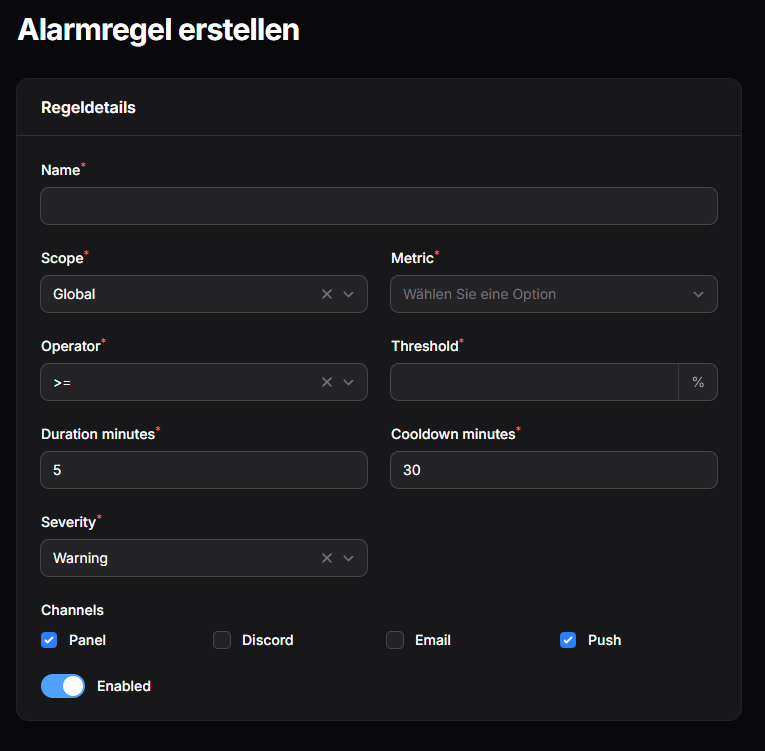
- Server RAM
>= 90%for 10 minutes, critical, 30-minute cooldown - Server CPU
>= 95%for 5 minutes, warning - Node disk
>= 85%for 15 minutes, warning - Server offline for 5 minutes, critical
- Backup failed for 0 minutes, warning
Permissions
Admin role permissions:
resourceAlertRule: list, view, create, update, deleteresourceAlertEvent: list, view, update, delete, receiveresourceAlertChannel: list, view, create, update, delete
Server subuser permissions:
alerts.viewalerts.createalerts.updatealerts.deletealerts.channelsalerts.receive
Server owners are allowed to view and manage their own server alerts. Subusers only receive special banners and inbox notifications when alerts.receive is granted.
Live Metric Availability
- Server CPU: live from
Server::retrieveResources() - Server RAM: live when the server has a memory limit
- Server disk: live when the server has a disk limit
- Server offline/crash state: live from
Server::retrieveStatus() - Node CPU/RAM/disk: live from
Node::statistics() - Node offline: live from Wings system information
- Backup failed: live from the latest completed backup
RAM and disk percentages are unavailable for unlimited servers because no valid denominator exists. Missing metrics are stored as unavailable samples and never trigger numeric rules.
server_crashed requires a previously observed running state followed by exited, dead, or offline. A missing Wings response is treated as unknown rather than a crash.
Browser Push
The plugin provides its own push subscription storage and service worker without changing Pelican core files. The plugin installer adds minishlink/web-push through the composer_packages manifest entry.
Generate the VAPID key pair once:
cd /var/www/pelican
sudo -u www-data php artisan resource-alerts:push-keys
sudo -u www-data php artisan optimize:clear
Users can then open their Pelican profile and select the Push Notifications tab. Clicking Enable push triggers the browser permission prompt and stores that browser's subscription encrypted. The Send test button verifies the complete delivery path.
Web Push requires HTTPS, except for browser-defined localhost development exceptions. If permission was denied previously, it must be restored in the browser's site settings before Pelican can ask again.
New rules select Panel and Browser Push by default. Existing rules must be edited once to add the push channel. Push is delivered only to subscribed recipients who would also be eligible for the alert.
Open alerts are also displayed through Pelican's announcement-style AlertBanner on admin and server panel pages. Panel Inbox notifications remain persistent and separate from browser push.
Commands
php artisan resource-alerts:check
php artisan resource-alerts:cleanup
php artisan resource-alerts:push-keys
The check command collects current samples, evaluates rules, and prints totals. The cleanup command applies sample and resolved-event retention immediately.
Troubleshooting
-
Migration error
3780from an older plugin build: remove the incomplete tables before retrying:sudo -u www-data php artisan tinker --execute="Schema::dropIfExists('resource_alert_channels'); Schema::dropIfExists('resource_alert_samples'); Schema::dropIfExists('resource_alert_events'); Schema::dropIfExists('resource_alert_rules');" -
No samples: verify Wings connectivity and run
resource-alerts:check. -
No notifications: verify a queue worker is running and the rule includes the intended channel.
-
No alert banner: clear caches and verify the logged-in user may receive the event; banners are shown for currently open alerts.
-
Push unavailable in the profile: run
resource-alerts:push-keys, confirm HTTPS, and reinstall/update the plugin ifminishlink/web-pushis missing. -
No browser permission prompt: permission prompts only run after clicking Enable push. Reset a previously blocked permission in the browser's site settings.
-
Push test fails: confirm the queue host can reach the browser vendor's push endpoint and that the VAPID subject is an HTTPS URL or
mailto:address. -
Push provider returns HTTP 401 or 403: the VAPID keys were probably changed after the browser subscribed. Disable and enable push again in the profile.
-
No email: configure Pelican's mail transport; the plugin skips unavailable mail delivery.
-
Repeated alerts: increase the rule cooldown and verify only one scheduler instance is running.
-
RAM/disk unavailable: configure a non-zero server resource limit.
-
Plugin UI missing: clear caches with
php artisan optimize:clearand verify the plugin is enabled foradminandserver.
Failures from Wings, Discord, or mail are logged without exposing webhook URLs and do not interrupt other targets.
Requirements
- File Size
- 119.94 KB
- License
- Proprietary