Draft Version
Version 1.2.5 is a draft awaiting submission by the plugin author.
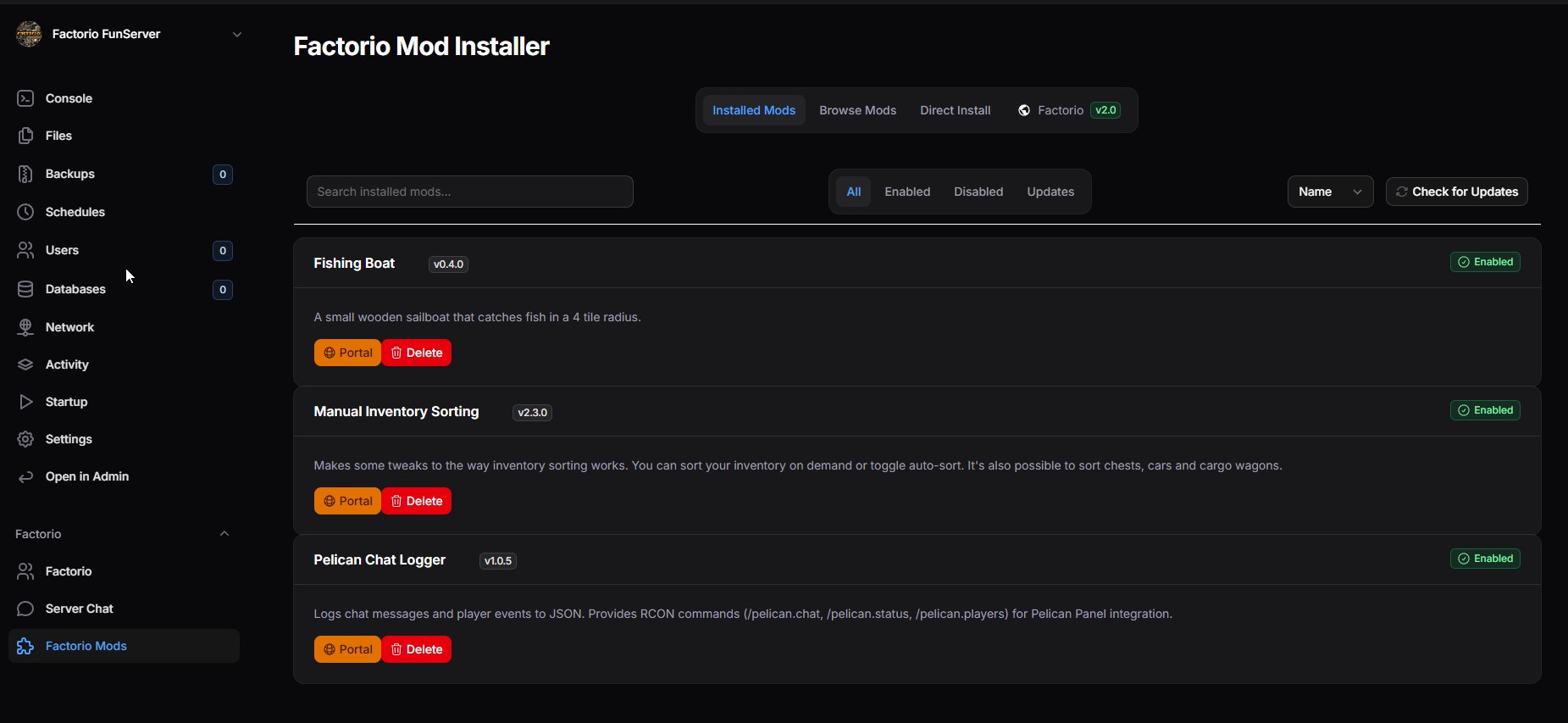
Factorio Mod Installer
 gOOvER|AT|CET
41
Downloads
100%
Positive (1 reviews)
4 months ago
Last Updated
Manual Plugin Import
- Log in to your panels admin area.
- Navigate to the Plugins section.
- Click the Import from File icon ()
- Upload the downloaded ZIP file and complete the install.
Factorio Mod Installer Plugin
A Pelican Panel plugin for managing Factorio mods directly from the server panel. This plugin provides a user-friendly interface to manage this configuration and automatically downloads mods from the Factorio Mod Portal.
Features
- View Installed Mods - See all mods currently installed on your server
- Add Mods - Add mods by entering their name from the Factorio Mod Portal
- Remove Mods - Remove mods from your server
- Browse Mod Portal - Search and browse mods from the Factorio Mod Portal directly in the panel
- One-Click Install - Add mods to your server directly from the mod browser
- Mod Details - View version, downloads count, and descriptions for each mod
- Enable/Disable Mods - Toggle mods on/off without removing them
Installation
Via Panel Frontend (Recommended)
- Go to your Pelican Panel admin area
- Navigate to Plugins
- Click the "Import" button
- Upload the plugin zip file
- The plugin will be automatically installed and enabled
Manual Installation
- Download and extract the plugin files
- Place the
factorio-mod-installerfolder in your Pelican Panel'spluginsdirectory (/var/www/pelican/pluginsby default) - Run
php artisan migrateto apply any database migrations (if applicable) - The plugin will automatically be discovered and loaded
Server Egg Configuration
For the plugin to appear on Factorio servers, add one of the following to your server egg:
- Add
factorioorfactorio-mod-installeras a tag - Add
factorio_mod_installerto the egg features array
Configuration
The plugin automatically works with Factorio's standard mod structure:
- Mods Directory:
<server_root>/mods/ - Mod List File:
<server_root>/mods/mod-list.json
The plugin will automatically create these if they don't exist.
How It Works
Factorio servers use a mod-list.json file where mods are listed:
{
  "mods": [
    {
      "name": "base",
      "enabled": true
    },
    {
      "name": "helmod",
      "enabled": true
    }
  ]
}
Mod Portal Integration
The plugin integrates with the Factorio Mod Portal API to:
- Fetch mod details (name, version, downloads, description)
- Search for mods by name
- Browse popular mods
- Display mod thumbnails and descriptions
- Download mod files directly to the server
Mod data is cached to improve performance:
- Individual mod details: 6 hours
- Mod portal search results: 15 minutes
Usage
Installing a Mod
- Navigate to your Factorio server in Pelican Panel
- Open the "Factorio Mod Installer" tab
- Click "Browse Mods" to search the mod portal
- Click "Install" on any mod you want to add
- The mod will be automatically downloaded and added to your server
Alternatively:
- Click "Add Mod" in the Installed Mods tab
- Enter the exact mod name (e.g., "helmod", "FNEI")
- Click "Add" to download and install
Removing a Mod
- Go to the "Installed Mods" tab
- Click the trash icon next to the mod you want to remove
- Confirm the removal
- The mod file and entry will be removed from your server
Enabling/Disabling Mods
- Go to the "Installed Mods" tab
- Toggle the "Enabled" checkbox for any mod
- The mod will remain installed but won't load in-game when disabled
Troubleshooting
Mod not found
- Verify the exact mod name on mods.factorio.com
- Mod names are case-sensitive
Download fails
- Check that the server has write permissions to the
mods/directory - Ensure the server has internet access to download from the Factorio Mod Portal
Mods not loading in-game
- Make sure the server is restarted after installing/removing mods
- Check that mods are enabled in the
mod-list.json - Verify mod compatibility with your Factorio version
Contributing
Feel free to submit issues and enhancement requests!
License
This plugin is provided under GPLv3.
Credits
- Inspired by the Arma Reforger Workshop Plugin
- Uses the Factorio Mod Portal API
Support
For issues and questions:
- Check the Pelican Panel documentation
- Review the Factorio Mod Portal API documentation
- Submit an issue on the plugin repository
Requirements
- File Size
- 59.03 KB
- License
- GPL-3.0