Egg Images
 Smayt
Smayt
24
Downloads
--
Positive (0 reviews)
1 week ago
Last Updated
Manual Plugin Import
- Log in to your panels admin area.
- Navigate to the Plugins section.
- Click the Import from File icon ()
- Upload the downloaded ZIP file and complete the install.
Egg Images
A Pelican Panel plugin that automatically fetches and manages game artwork for your eggs using Steam and IGDB.



Features
- Steam artwork — fetch game images directly from Steam CDN by App ID or automatic name search
- IGDB fallback — fetch artwork from IGDB (via Twitch API) for non-Steam games
- Image protection — manually set images are never overridden by auto-fetch
- Bulk fetch — fetch artwork for all eggs at once from Steam or IGDB
- Per-egg control — fetch, protect, unprotect, or clear images per egg
- Admin overview — dedicated admin page showing all eggs with image status, Steam App ID, and protection state
- Secure credentials — API keys stored via plugin settings, never hardcoded
Screenshots
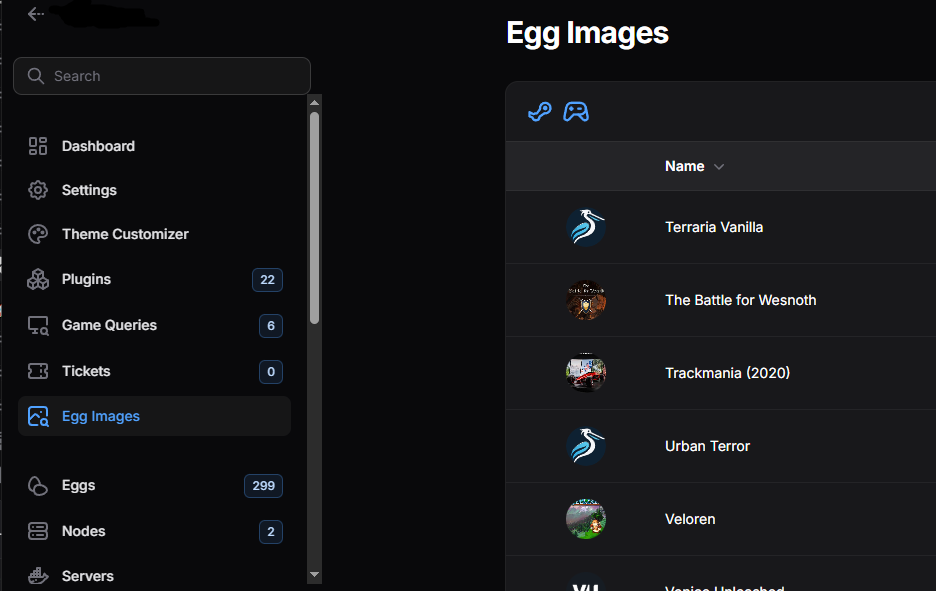
The plugin adds an Egg Images page under Service Management in the admin panel:
| Column | Description |
|---|---|
| Icon | Current egg artwork (or Pelican fallback) |
| Name | Egg name |
| Steam App ID | Steam App ID if fetched from Steam |
| Protected | Whether auto-fetch is blocked for this egg |
| Has Image | Whether the egg has artwork |
Requirements
- Pelican Panel v1.0.0-beta35 or higher
- PHP 8.3+
- Twitch Developer account for IGDB support (free, optional)
Installation
Manual
# Copy plugin to your Pelican plugins directory
cp -r egg-images /var/www/pelican/plugins/

# Install the plugin
cd /var/www/pelican
php artisan p:plugin:install egg-images

# Fix permissions (done automatically by plugin provider on boot)
chown -R www-data:www-data /var/www/pelican/plugins/egg-images

# Create storage link if not already done
php artisan storage:link
From zip
cd /var/www/pelican/plugins
unzip egg-images-plugin.zip
cd /var/www/pelican
php artisan p:plugin:install egg-images
php artisan storage:link
Configuration
IGDB (optional)
To enable IGDB fallback for non-Steam games:
- Go to https://dev.twitch.tv/console
- Create a new application (type: Application Integration)
- Generate a Client Secret
- In Pelican: Admin → Plugins → Egg Images → Settings
- Enter your Twitch Client ID and Twitch Client Secret
- Save settings
Steam
No credentials required — Steam CDN is public. Steam auto-fetch works out of the box.
Usage
Single egg
Navigate to Admin → Egg Images, find your egg and use the row actions:
| Action | Description |
|---|---|
| 🔗 Fetch Steam | Enter a Steam App ID to fetch artwork from Steam |
| 🎮 Fetch IGDB | Search IGDB by name to fetch artwork |
| 🔒 Protect | Lock the image — auto-fetch will skip this egg |
| 🔓 Unprotect | Allow auto-fetch to update this egg's image |
| 🗑️ Clear | Remove the current image and unprotect |
Bulk fetch
Use the toolbar buttons at the top of the Egg Images page:
- Auto-fetch all from Steam — searches Steam by egg name for all unprotected eggs without an image
- Auto-fetch missing from IGDB — searches IGDB for all unprotected eggs still missing an image after Steam fetch
Note: Bulk operations process all eggs sequentially and may take a few minutes. The page will appear frozen during this time — this is normal.
How images are stored
Images are stored using Pelican's built-in HasIcon trait:
storage/app/public/icons/egg/{egg-uuid}.jpg
Accessible via the public storage URL after running php artisan storage:link.
How metadata is stored
No database migrations required. Metadata is stored in the egg's existing tags array:
| Tag | Description |
|---|---|
steam:892970 |
Steam App ID for this egg |
icon:protected |
Image is manually set, skip auto-fetch |
Uninstall
cd /var/www/pelican
php artisan p:plugin:uninstall egg-images
Note: This removes the plugin but does not delete egg images already downloaded. To remove images manually:
rm -rf /var/www/pelican/storage/app/public/icons/egg/
License
MIT — feel free to use, modify and distribute.
Contributing
Pull requests welcome. Built for Pelican Panel beta — expect API changes as Pelican matures.
Requirements
- File Size
- 10.64 KB
- License
- Proprietary